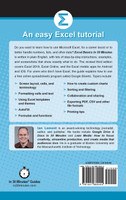
Revised third edition for Excel 2019! Here's your chance to finally learn how to use Microsoft Excel! In a single sitting, this quick and easy user guide will help you learn MS Excel basics, from navigating the home screen to working with formulas and charts. It's a great Excel tutorial that will help you in the office, at school, or even at home.
Excel Basics In 30 Minutes, 3rd Edition is written in plain English, with lots of step-by-step instructions and screenshots that demonstrate exactly what to do. This MS Excel tutorial references Excel 2019, but most of the step-by-step instructions apply to earlier versions of MS Excel released as part of the Microsoft Office and Office 365 suites, including Excel 2016. If you don't own Excel, the book explains how to use two free online spreadsheets programs: Excel Online and Google Sheets (part of the Google Drive online office suite). The book also explains how to use the Excel mobile apps for Android and iOS.
Topics covered
Excel screen layout, cells, and terminology
Excel 2019 vs. Excel Online vs. Google Sheets
Excel for iOS and Excel for Android
Basic Excel formatting
AutoFill
Excel formulas and functions
How to make charts in Excel
Sorting and filtering
Collaboration and sharing
Exporting PDF, CSV, and other forms
Printing tips
Excel import and export formats (PDF, .CSV, .TSV, text, etc.)
This is not an Excel bible, but rather a basic Excel tutorial and reference that answers the core questions that any new Excel user will have:
What is a spreadsheet?
What are cells?
What is the button with the Greek letter for?
How can Excel spreadsheets create basic financial projections?
How can certain data in a worksheet be highlighted?
How can data be alphabetized or ranked?
How to edit a chart in Excel
How to print an Excel spreadsheet without cutting off columns
The third edition is up-to-date with new instructions and high-resolution screenshots of Excel 2019, Excel Online, and the new Google Sheets. It includes new sections about collaboration, OneDrive, and other features.
Revised third edition for Excel 2019! Here's your chance to finally learn how to use Microsoft Excel! In a single sitting, this quick and easy user guide will help you learn MS Excel basics, from navigating the home screen to working with formulas and charts. It's a great Excel tutorial that will help you in the office, at school, or even at home.
Excel Basics In 30 Minutes, 3rd Edition is written in plain English, with lots of step-by-step instructions and screenshots that demonstrate exactly what to do. This MS Excel tutorial references Excel 2019, but most of the step-by-step instructions apply to earlier versions of MS Excel released as part of the Microsoft Office and Office 365 suites, including Excel 2016. If you don't own Excel, the book explains how to use two free online spreadsheets programs: Excel Online and Google Sheets (part of the Google Drive online office suite). The book also explains how to use the Excel mobile apps for Android and iOS.
Topics covered
Excel screen layout, cells, and terminology
Excel 2019 vs. Excel Online vs. Google Sheets
Excel for iOS and Excel for Android
Basic Excel formatting
AutoFill
Excel formulas and functions
How to make charts in Excel
Sorting and filtering
Collaboration and sharing
Exporting PDF, CSV, and other forms
Printing tips
Excel import and export formats (PDF, .CSV, .TSV, text, etc.)
This is not an Excel bible, but rather a basic Excel tutorial and reference that answers the core questions that any new Excel user will have:
What is a spreadsheet?
What are cells?
What is the button with the Greek letter for?
How can Excel spreadsheets create basic financial projections?
How can certain data in a worksheet be highlighted?
How can data be alphabetized or ranked?
How to edit a chart in Excel
How to print an Excel spreadsheet without cutting off columns
The third edition is up-to-date with new instructions and high-resolution screenshots of Excel 2019, Excel Online, and the new Google Sheets. It includes new sections about collaboration, OneDrive, and other features.
Think a delicious curry takes forever to cook at home? Think again.In this mouth-watering collection of recipes, Michelin-starred chef Atul Kochhar shows you how to create simple, delicious curries...
Discover your next great read at BookLoop, Australiand online bookstore offering a vast selection of titles across various genres and interests. Whether you're curious about what's trending or searching for graphic novels that captivate, thrilling crime and mystery fiction, or exhilarating action and adventure stories, our curated collections have something for every reader. Delve into imaginative fantasy worlds or explore the realms of science fiction that challenge the boundaries of reality. Fans of contemporary narratives will find compelling stories in our contemporary fiction section. Embark on epic journeys with our fantasy and science fiction titles,
Shop Trending Books and New Releases
Explore our new releases for the most recent additions in romance books, fantasy books, graphic novels, crime and mystery books, science fiction books as well as biographies, cookbooks, self help books, tarot cards, fortunetelling and much more. With titles covering current trends, booktok and bookstagram recommendations, and emerging authors, BookLoop remains your go-to local australian bookstore for buying books online across all book genres.
Shop Best Books By Collection
Stay updated with the literary world by browsing our trending books, featuring the latest bestsellers and critically acclaimed works. Explore titles from popular brands like Minecraft, Pokemon, Star Wars, Bluey, Lonely Planet, ABIA award winners, Peppa Pig, and our specialised collection of ADHD books. At BookLoop, we are committed to providing a diverse and enriching reading experience for all.
Sign In
your cart
Your cart is empty
Menu
Search
PRE-SALES
If you have any questions before making a purchase chat with our online operators to get more information.