Trending Bestseller

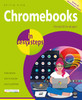
Chromebooks in easy steps

No reviews yet Write a Review
<p><strong>Chromebooks in easy steps</strong> is ideal for anyone new to the Chromebook, including Seniors. It covers all the main features of this budget-friendly alternative to a Windows laptop or MacBook.</p>
Paperback / softback
10-March-2022
$30.00
Ships in 5–7 business days
Hurry up! Current stock:

Chromebooks in easy steps illustrates all the clever features of this versatile, budget-friendly alternative to a Windows laptop or MacBook. Covering all Chromebook models, it:


•         Demystifies what a Chromebook is and how it differs from other types of laptops and tablets.

•         Shows how to get your Chromebook up and running in no time.

•         Guides you through the Chrome web browser, Gmail and other key apps such as Docs, Sheets, and Slides.

•         Reveals how to make video calls using a variety of services, to stay in touch with friends and family.

•         Shows how to connect your Chromebook to external devices including printers.

•         Demonstrates how to upload and organise your photos, videos, and documents in the Cloud.

•         Covers how to make documents available offline when you don’t have an internet connection.

•         Guides you through how to watch TV and movies, and how to download and use Android apps and games.

•         Provides guidance on maintenance and troubleshooting.


Ideal for anyone new to the Chromebook, including Senior readers.

This product hasn't received any reviews yet. Be the first to review this product!

$30.00
Ships in 5–7 business days
Hurry up! Current stock:

Chromebooks in easy steps

$30.00

Description

Chromebooks in easy steps illustrates all the clever features of this versatile, budget-friendly alternative to a Windows laptop or MacBook. Covering all Chromebook models, it:


•         Demystifies what a Chromebook is and how it differs from other types of laptops and tablets.

•         Shows how to get your Chromebook up and running in no time.

•         Guides you through the Chrome web browser, Gmail and other key apps such as Docs, Sheets, and Slides.

•         Reveals how to make video calls using a variety of services, to stay in touch with friends and family.

•         Shows how to connect your Chromebook to external devices including printers.

•         Demonstrates how to upload and organise your photos, videos, and documents in the Cloud.

•         Covers how to make documents available offline when you don’t have an internet connection.

•         Guides you through how to watch TV and movies, and how to download and use Android apps and games.

•         Provides guidance on maintenance and troubleshooting.


Ideal for anyone new to the Chromebook, including Senior readers.

Customers Also Viewed